
How to Make a Fast Website: The Complete Guide to Website Speed Optimization (2026)

A fast website is no longer just a nice feature—it’s a necessity. Whether you own a business website, an online store, or a personal blog, website speed directly impacts your SEO rankings, user experience, and conversion rate.
If you’re wondering how to make a fast website, this guide covers the most effective website speed optimization techniques you can implement today.
Why Website Speed Matters
Website visitors expect pages to load in less than three seconds. If your website takes longer, users are more likely to leave before interacting with your content.
A fast website provides:
- Better user experience
- Higher Google rankings
- Increased sales and conversions
- Lower bounce rates
- Improved mobile performance
- Better Core Web Vitals scores
Simply put, faster websites make more money.
1. Choose High-Performance Web Hosting

The foundation of a fast website begins with quality hosting.
Avoid cheap shared hosting if your website receives regular traffic.
Choose hosting that offers:
- SSD or NVMe storage
- LiteSpeed or Nginx servers
- Free CDN
- Server-side caching
- PHP 8.3 or newer
- HTTP/3 support
Good hosting can reduce loading time dramatically.
2. Compress and Optimize Images
Large images are one of the biggest reasons websites become slow.
Always:
- Resize images before uploading
- Compress images without losing quality
- Use WebP or AVIF image formats
- Enable lazy loading
- Avoid uploading oversized files
Optimized images can reduce page size by more than 70%.
3. Enable Browser Caching
Browser caching stores static files on visitors’ devices.
When users return to your website, pages load much faster because browsers don’t need to download everything again.
Caching improves both desktop and mobile performance.
4. Use a Content Delivery Network (CDN)

A CDN stores copies of your website on servers around the world.
Visitors automatically receive content from the nearest server.
Benefits include:
- Faster global loading
- Lower server load
- Better uptime
- Improved security
CDNs are essential for international websites.
5. Minify CSS, JavaScript, and HTML
Your website contains many code files.
Minifying removes:
- Extra spaces
- Comments
- Unused code
This reduces file sizes and speeds up loading.
Many optimization plugins perform this automatically.
6. Reduce HTTP Requests
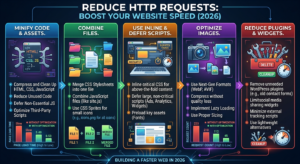
Every image, font, script, and stylesheet creates an HTTP request.
Reduce requests by:
- Combining CSS files
- Combining JavaScript files
- Removing unused plugins
- Limiting third-party scripts
- Using SVG icons instead of multiple images
Fewer requests equal faster loading.
7. Use Lightweight Themes
A heavy WordPress theme can slow down your website significantly.
Choose themes that are:
- Lightweight
- Mobile responsive
- SEO-friendly
- Regularly updated
Avoid themes loaded with unnecessary animations and features.
8. Remove Unnecessary Plugins
Too many plugins increase loading time.
Keep only plugins that are necessary.
Delete:
- Unused plugins
- Duplicate plugins
- Outdated plugins
Regular plugin maintenance keeps your website running efficiently.
9. Enable GZIP or Brotli Compression
Compression reduces the size of website files before they are sent to visitors.
Benefits include:
- Faster downloads
- Reduced bandwidth usage
- Better page speed
Most modern hosting providers support GZIP or Brotli.
10. Optimize Your Database
Over time, your database collects unnecessary data such as:
- Spam comments
- Post revisions
- Expired transients
- Unused tables
Cleaning your database regularly improves website performance.
11. Improve Core Web Vitals
Google uses Core Web Vitals as a ranking factor.
Focus on improving:
Largest Contentful Paint (LCP)
Load your main content quickly.
Interaction to Next Paint (INP)
Ensure your website responds quickly to user interactions.
Cumulative Layout Shift (CLS)
Prevent elements from moving unexpectedly while the page loads.
Improving these metrics helps both SEO and user satisfaction.
12. Use Lazy Loading
Lazy loading delays images and videos until users scroll near them.
Advantages:
- Faster initial page load
- Reduced bandwidth
- Better mobile performance
This feature is supported by most modern browsers and WordPress.
13. Limit Third-Party Scripts
External scripts from ads, analytics, chat widgets, and social media can slow your site.
Only use scripts that provide real value.
Regularly audit and remove unnecessary integrations.
14. Optimize Fonts
Custom fonts often increase loading time.
Best practices:
- Use only the font weights you need
- Preload important fonts
- Use modern font formats like WOFF2
- Minimize the number of font families
Typography optimization improves both speed and visual consistency.
15. Regularly Test Website Speed
Performance optimization is an ongoing process.
Regular testing helps identify new issues before they affect visitors.
Monitor:
- Loading time
- Page size
- Core Web Vitals
- Mobile performance
- Server response time
Consistent monitoring ensures your website remains fast as it grows.
Common Mistakes That Slow Down Websites
Avoid these common issues:
- Uploading uncompressed images
- Installing too many plugins
- Using poor-quality hosting
- Ignoring caching
- Running outdated software
- Adding excessive animations
- Loading unnecessary third-party scripts
Fixing these problems can noticeably improve performance.
Benefits of Having a Fast Website
A fast website offers significant advantages:
- Better Google rankings
- Improved SEO performance
- Higher user engagement
- Increased conversions
- Lower bounce rates
- Better mobile experience
- Stronger brand credibility
Website speed is one of the easiest ways to improve overall website performance.
Final Thoughts
Knowing how to make a fast website is essential for anyone serious about online success. Speed affects everything from SEO and user experience to sales and customer satisfaction.
By choosing reliable hosting, optimizing images, enabling caching, minimizing code, improving Core Web Vitals, and regularly monitoring performance, you can build a website that loads quickly and keeps visitors engaged.
Website speed optimization isn’t a one-time task—it’s an ongoing process. The faster your website, the better your results will be in search engines and with your audience.
Frequently Asked Questions (FAQs)
How fast should a website load?
A website should ideally load in under 2–3 seconds for the best user experience and SEO performance.
Does website speed affect SEO?
Yes. Google considers page speed and Core Web Vitals as ranking signals, making faster websites more likely to perform well in search results.
What’s the biggest cause of a slow website?
Common causes include large images, poor hosting, too many plugins, unoptimized code, and excessive third-party scripts.
How often should I optimize my website?
Review your website’s performance every month and after adding new features, plugins, or significant content.