
10 COMMON REASONS YOUR WEBSITE IS SLOW (AND HOW TO FIX THEM)
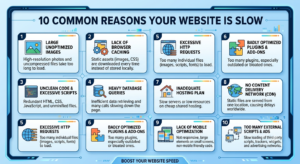
A slow website can hurt your business in more ways than one. Visitors expect a website to load within a few seconds. If your pages take too long, users may leave before exploring your content, products, or services. In addition, search engines like Google consider website speed when ranking pages, making performance an important part of SEO.
In this guide, we’ll explore the 10 Common Reasons Your Website Is Slow, explain why they matter, and show you practical ways to improve your website’s performance.
Why Website Speed Matters
Website speed directly affects user experience, search engine rankings, and conversion rates. A fast-loading website keeps visitors engaged, reduces bounce rates, and increases the chances of generating leads or sales.
Some of the biggest benefits of a fast website include:
- Better user experience
- Higher Google rankings
- Lower bounce rate
- More conversions and sales
- Improved mobile performance
- Better Core Web Vitals scores
1. Large and Unoptimized Images
One of the 10 Common Reasons Your Website Is Slow is oversized image files.
High-resolution images can significantly increase page size, causing slower loading times.
How to Fix It
- Compress images before uploading.
- Use modern formats like WebP or AVIF.
- Resize images to the correct dimensions.
- Enable lazy loading.
2. Too Many HTTP Requests
Every image, CSS file, JavaScript file, and font creates an HTTP request. The more requests your website makes, the longer it takes to load.
How to Fix It
- Combine CSS and JavaScript files.
- Remove unnecessary plugins and assets.
- Reduce external scripts whenever possible.
3. Poor Web Hosting
Cheap or overloaded hosting servers often lead to slow website performance.
How to Fix It
- Upgrade to quality hosting.
- Use VPS or cloud hosting for growing websites.
- Choose hosting with SSD or NVMe storage.
4. Too Many Plugins
Installing unnecessary plugins can slow down your website by increasing server requests and loading extra code.
How to Fix It
- Remove unused plugins.
- Keep only trusted and updated plugins.
- Replace multiple plugins with one efficient solution.
5. Unoptimized CSS and JavaScript
Large CSS and JavaScript files delay page rendering.
How to Fix It
- Minify CSS and JavaScript files.
- Remove unused code.
- Defer non-critical JavaScript.
- Load important CSS first.
6. No Browser Caching
Without browser caching, visitors must download the same files every time they visit your website.
How to Fix It
- Enable browser caching.
- Set proper cache expiration rules.
- Use caching plugins if you’re using WordPress.
7. No Content Delivery Network (CDN)
Visitors who are far from your server may experience slower loading speeds.
How to Fix It
A CDN stores copies of your website on servers around the world, allowing users to load content from the nearest location.
Popular CDN providers include Cloudflare, Bunny CDN, and Amazon CloudFront.
8. Excessive Redirects
Too many redirects force browsers to make additional requests before reaching the final page.
How to Fix It
- Remove unnecessary redirects.
- Update internal links.
- Fix broken URLs.
9. Database Issues
Over time, databases collect unnecessary data such as revisions, spam comments, and temporary files.
How to Fix It
- Optimize your database regularly.
- Delete unnecessary revisions.
- Clean spam comments.
- Remove unused tables.
10. Too Much Third-Party Code

External scripts like advertisements, chat widgets, social media feeds, and analytics tools can slow your website.
How to Fix It
- Load only essential third-party scripts.
- Remove unused integrations.
- Delay loading non-essential widgets.
Bonus Tips to Improve Website Performance
Besides fixing the 10 Common Reasons Your Website Is Slow, consider these additional optimization techniques:
- Enable GZIP or Brotli compression.
- Use HTTP/2 or HTTP/3.
- Optimize fonts.
- Reduce page size.
- Enable lazy loading for videos and images.
- Keep your CMS and plugins updated.
- Monitor Core Web Vitals regularly.
Tools to Test Website Speed
You can measure your website performance using tools like:
- Google PageSpeed Insights
- GTmetrix
- Pingdom Website Speed Test
- Lighthouse
- WebPageTest
These tools identify performance issues and provide recommendations for improvement.
Final Thoughts
Understanding the 10 Common Reasons Your Website Is Slow is the first step toward creating a faster, more user-friendly website. From optimizing images and reducing unnecessary plugins to choosing better hosting and using a CDN, every improvement contributes to a better browsing experience.
A fast website not only improves SEO rankings but also increases user satisfaction, engagement, and conversions. Make website speed optimization a regular part of your maintenance routine, and your visitors—and search engines—will thank you.
If you want your website to rank higher on Google and deliver an exceptional user experience, start addressing these common performance issues today.